Data & accuracy
Every figure in Stream Markets carries two small answers alongside it: where it came from, and how old it is. We do not quote an accuracy percentage - instead, each number is meant to be checkable against the document it came from. This page shows how to read those chips on a real row, and what to do when a number is wrong.
Reading a row
Open BHP and click the Resources tab. Each row is one published estimate. Take the Antamina copper reserve: 79 Mt at 0.85%, dated 30 June 2025, reported under S-K 1300. In the Source column sits a green Primary chip with an Open link - click Open and you are reading the filing that reported the number, so you can check it yourself.
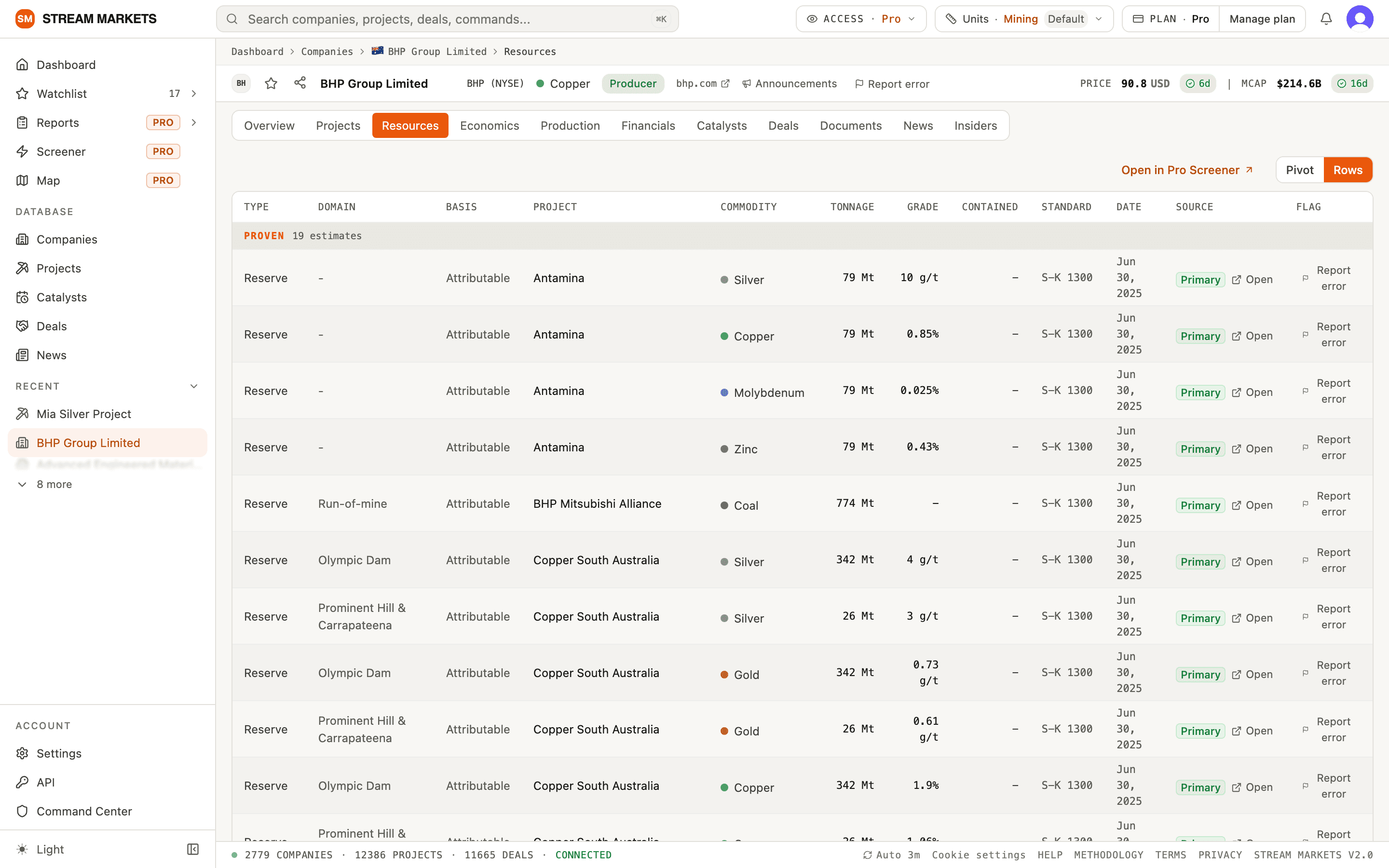
- The figure - issuer-reported values are stored as published. Display conversions and derived contained quantities are labelled; check the unit and basis.
- Date - the date the estimate carries in the filing, so you know which statement you are looking at.
- Source chip - names what the link opens; Open takes you to the document itself.
- Report error - the flag at the end of the row, for when the number does not match the filing.
The source labels
Source chips distinguish document links, fallback links and missing sources. The first two mean a link straight to the document. The rest are honest about what is missing rather than pretending a link exists.
- Primary - the link opens the exchange or regulator’s own archive (ASX announcements, SEC, SEDAR+). The definitive copy.
- Direct - the link opens the exact document on another host, usually the company’s own website or its investor-relations provider.
- Filings - the row has a source, but its stored link is an exchange template that misfiles, so the chip opens the company's filings page instead; find the announcement there by title and date. Archive - the link is an archived or legacy-host copy: it opens, but may have moved. Neither says anything about the figure itself, which was extracted and checked like every other row.
- Via filings - we have not linked the exact document for that row yet. Clicking says so and points you at the company’s own filings page and the documents we track.
- Unsourced - we cannot yet point anywhere for that row, and the label says so rather than pretending otherwise.
- Vendor - the value comes from a market data feed, not a filing, and carries the date it was refreshed.
The freshness chips
Next to prices, market cap and the key figures on company pages you will see a small chip with a day count: 6d beside BHP’s price, 230d beside its reported debt. Read the accompanying label: Reported identifies a reporting period, Close a price date, and Updated a refresh. An age badge counts from its labelled date; it does not certify accuracy. The colour bands with age - green within a month, amber to about three months, red beyond that - and hovering shows the exact date behind the count.
Old data is labelled, not hidden. A resource estimate from three years ago is often still the most recent one the company has published, and knowing that is exactly the point of the chip.
Reporting a wrong number
You probably know one or two companies better than we do. If a number does not match the filing, use Report error - it sits in the header of every company and project page, and as the flag at the end of resource, economics, production and screener rows. The popover captures where you were and which record you meant, so all you type is the problem itself.
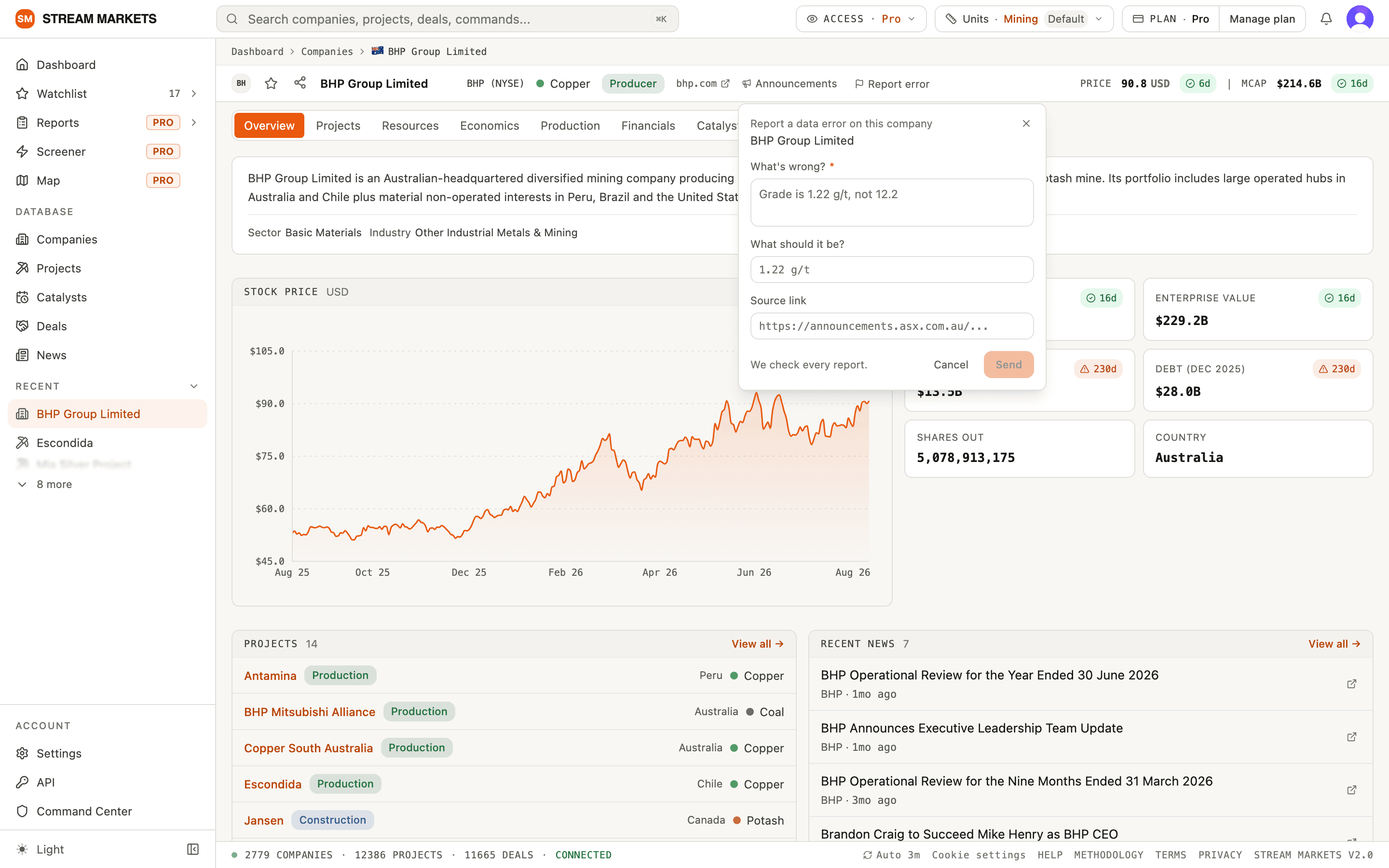
- What’s wrong? - one line, like the example in the box: ‘Grade is 1.22 g/t, not 12.2’.
- What should it be? - the correct value, if you know it.
- Source link - the filing that shows it. A report without a link is still worth sending.
- After you send - reports are reviewed against the source and outcomes appear in your Inbox. A completed review and an underlying data change are tracked separately; read the reviewer’s note.
Where the numbers come from
Almost everything in the database is extracted from primary documents the companies themselves published: annual and quarterly reports, technical studies, resource statements and exchange announcements. Market data such as prices and market cap comes from a third-party vendor feed on its own refresh schedule. How the extraction is audited, and where the data is weakest, is documented in full on the methodology page.
Where next
For what lives on each company and project page, see companies and projects. New to the app entirely, start with getting started. And if something needs more than a row-level fix, email hello@stream-markets.com - a person reads it.
Quick steps
- Sign in, then open the affected company or project and choose Report error in its header, or the flag on the affected data row.
- Fill in What's wrong? with the field, displayed value and problem. What should it be? and Source link are optional; include the filing date or page if available.
- Choose Send and wait for confirmation. A submitted flag shows Reported; clicking Reported withdraws your open report.
Reporting a company or row error
- Use Report error in the company header for an incorrect description, ticker or company fact. For a resource, economics or production figure, prefer that row’s flag so the report identifies the exact record.
- The form requires more than two characters in What's wrong? and accepts up to 2,000. The suggested value and source link each accept up to 500. Use an http or https source link. You can send a report without knowing the replacement value or having a source link.
- The form attaches the record and page for review. Include the affected tab, units, reporting date and source page where useful. Cancel, Escape or clicking outside closes the form without sending it.
- StreamBot can help draft the wording and explain where to send it. It cannot submit a correction, email support or edit shared company data on your behalf. Describing an error in chat does not create a report.
After sending, withdrawing and failed reports
- Wait for the success confirmation after Send. Reported means flagged for review, not that the underlying data has been fixed. An error or a flag that reverts means submission was not confirmed.
- Only one open report per record is kept for your account. To replace an open report, click Reported to withdraw it, then submit the revised details. Completed reviews are not withdrawn by this control.
- Review outcomes appear in your Inbox. Email depends on delivery being enabled. A review can confirm that attention is needed or explain why the value was left unchanged; an underlying data change is tracked separately. There is no promised turnaround time.
- If the flag is unavailable, you cannot sign in, a submission keeps failing, or you need to report a missing company or a wider problem, email hello@stream-markets.com with the page link and details.
Checking the value before reporting
- Open the source link and compare the reporting date, currency, physical units, ownership basis and category. App display units and analyst export units can differ without changing the underlying fact.
- Primary and Direct links identify a document. Filings or Via filings may lead to a filings list; use title and date to find the document. An unavailable source is a gap, not proof the figure is wrong.
- Reported dates, market closes and refresh timestamps describe different things. A recently refreshed record can still contain an older financial reporting period.
- Resources, reserves and overlapping categories must not simply be added together. Derived contained quantities are labelled; missing figures must not be treated as zero.